

Digests
Digests let users receive a category of notifications once an hour, once a day, or once a week, instead of one email at a time. The bell still shows each notification right away, while the emails wait for one digest per user. Emails that arrive outside the user's notification hours, or while the user paused their notifications, wait the same way.
Setup
Digests build on the preferences. Add 'digest' => true to each category that users may receive in a digest:
// config/inertia-notifications.php

return [
    'preferences' => [
        'categories' => [
            'comments' => ['label' => 'Comments', 'digest' => true],
            'reports' => ['label' => 'Weekly reports', 'channels' => ['mail'], 'digest' => true],
            'security' => ['label' => 'Security', 'locked' => true],
        ],
    ],
];
The NotificationPreferences component then shows a Frequency menu for each of these categories, starting at Instantly, followed by the frequencies that you offer, such as Hourly digest. Locked categories, and categories without a channel that digests hold, get no menu. The menu is disabled while the user receives the category on none of those channels.
Run the Migration
The held notifications wait in their own notification_digest_items table, which the package publishes with its other migrations. Publish and run the migrations:
php artisan vendor:publish --tag=inertia-notifications-migrations
php artisan migrate
UUID and ULID keys
Notifiable models with UUID or ULID keys need a change to the published notification_digest_items migration before you run it, as the notification center setup describes.
Schedule the Command
The inertia-notifications:send-digests command sends the digests whose time has come. Each user receives their digest at the digest time in their own timezone, so schedule the command every minute in your routes/console.php file:
use Illuminate\Support\Facades\Schedule;

Schedule::command('inertia-notifications:send-digests')
    ->everyMinute()
    ->withoutOverlapping();
Configuration
The digests section of the configuration file has the following options:
| Option | Default | Description |
|---|---|---|
table | 'notification_digest_items' | The table of the held notifications. Set it before you run the migration. |
channels | ['mail'] | The channels that digests hold, as keys of the preference channels. |
frequencies | ['hourly', 'daily', 'weekly'] | The digest frequencies that users may choose, besides receiving a category right away. |
time | '08:00' | The time of day that digests are sent, in the timezone of each user. |
weekday | 'monday' | The day of the week that weekly digests are sent. |
notification | NotificationDigest::class | The notification that sends a digest. See The Digest Notification. |
inbox_url | null | The page with every notification, which the digest mail links to. |
preferences_url | null | The page where users change their preferences, which the digest mail links to. |
Which Channels Wait
Digests hold the channels in the digests.channels option, as keys of the preference channels, such as mail. The notification center's own inbox channel stores the notification right away, and the notification's other channels send as usual.
A notification that the user turned off, or that once() or unlessReadWithin() holds back, does not wait for a digest. The digest shows the notification's toInbox message, so a notification without a toInbox method sends right away, such as one that only Laravel's database channel stores.
When Digests Are Sent
Hourly digests are sent at the start of every hour in each user's timezone, daily digests at the time option in that timezone, and weekly digests at that time on the weekday option. Hourly, daily, and weekly digests that are due at the same time go out as one.
An hour starts at a different minute in some timezones, so a user in Asia/Kolkata receives the hourly digest at half past the hour in UTC. A digest whose time falls outside the user's notification hours, or within a pause, waits until notifications reach the user again.
Changing a category's frequency moves its held notifications to the next digest of the new frequency. Changing it back to Instantly sends them with the next run of the command.
Choosing the Frequencies
Users may choose an hourly, daily, or weekly digest for each category by default. To offer fewer frequencies, list the ones users may choose in the frequencies option:
// config/inertia-notifications.php

return [
    'digests' => [
        'frequencies' => ['daily', 'weekly'],
    ],
];
Users may always receive a category right away, so the menu starts with Instantly whatever you list. The responses of the preferences endpoint list the offered frequencies in their frequencies key, such as ["instant", "daily", "weekly"], for your own forms. The update method ignores a frequency that you do not offer, and the endpoint rejects it with a 422 response. A user who chose a frequency that you stop offering receives the category right away until they choose another one.
The Timezone of Each User
The component sends the browser's timezone whenever the user changes a frequency or the notification hours. To use a timezone that your application stores, pass a callback to the resolveTimezoneUsing method, typically in the boot method of your AppServiceProvider:
use App\Models\User;
use InertiaUI\Notifications\NotificationPreferences;

NotificationPreferences::resolveTimezoneUsing(fn (User $user): ?string => $user->timezone);
The timezone of the browser applies while the callback returns null, and the application's timezone applies without either.
Held notifications keep the digest time of the timezone they were held in, and the package does not notice a change of the timezone that your callback returns. Call the reschedule method of the Digest class once that timezone changes, such as in a model event, to move them to the digest time in the new timezone:
use App\Models\User;
use InertiaUI\Notifications\Digest;

User::updated(function (User $user) {
    if ($user->wasChanged('timezone')) {
        Digest::reschedule($user, timezoneChanged: true);
    }
});
What the Digest Leaves Out
The command checks each held notification again before it sends the digest, and leaves out the following notifications:
- Notifications whose category the user turned off on the channel since they were held, also with the channel switch.
- Notifications that wait with
unlessReadWithin()for the channel, once the user has read them. - Notifications that the notification center stored, once they are gone from it, such as after
Inbox::retract()or after the user deleted them.
Other notifications stay in the digest even after the user reads them. A notification that you changed with Inbox::update() shows its new message, and notifications that collapsed into one show once, with the collapsed message. A user whose held notifications were all left out receives no digest.
The Digest Notification
The package sends the digest with the InertiaUI\Notifications\Notifications\NotificationDigest notification, through each channel that held a notification. Its mail has a subject such as "You have 5 new notifications", and opens with the number of notifications in each category when there are several. Then each category lists its notifications, newest first, with the actor's avatar or initials and the time in the user's timezone. Each title links to the notification's URL:
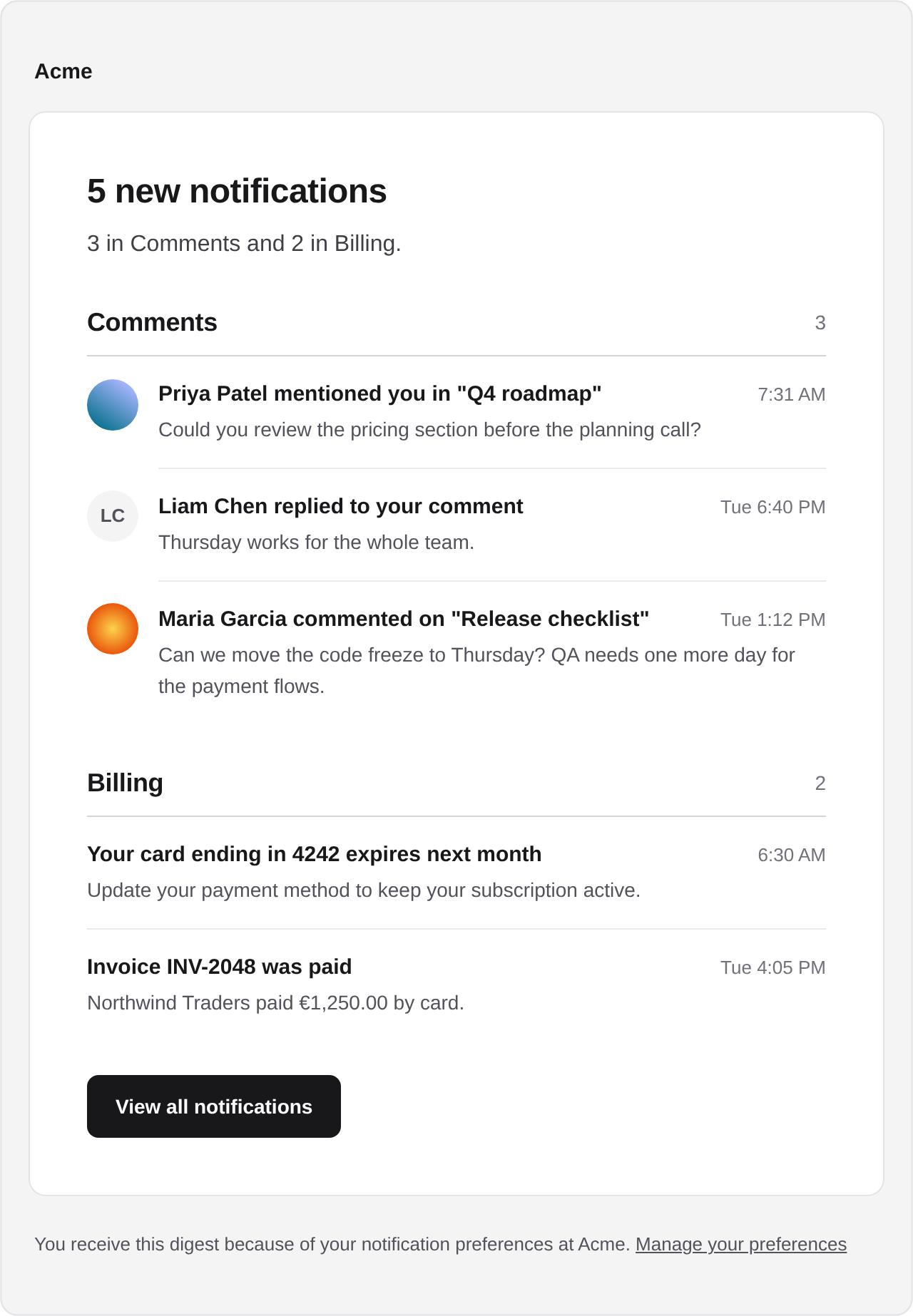
The mail also has a plain text version with the same content. Its own text, such as "View all notifications", passes through Laravel's __ helper, so you may translate it in your application's lang JSON files.
Linking to Your Pages
The mail links to your notifications page and your preferences page once you set the inbox_url and preferences_url options. A mail without them leaves out the View all notifications button and the Manage your preferences link:
// config/inertia-notifications.php

return [
    'digests' => [
        // ...
        'inbox_url' => '/notifications',
        'preferences_url' => '/settings/notifications',
    ],
];
The URLs are the same for every user. To link each user to their own pages, such as the pages of their team, extend the notification and override the inboxUrl and preferencesUrl methods:
namespace App\Notifications;

use InertiaUI\Notifications\Notifications\NotificationDigest;

class TeamDigest extends NotificationDigest
{
    protected function inboxUrl(object $notifiable): ?string
    {
        return route('teams.notifications', $notifiable->currentTeam);
    }

    protected function preferencesUrl(object $notifiable): ?string
    {
        return route('teams.notification-preferences', $notifiable->currentTeam);
    }
}
Then set your class as the notification option.
Changing the Mail
You may publish the views of the mail to change its markup and styles:
php artisan vendor:publish --tag=inertia-notifications-viewsThe HTML version is then in resources/views/vendor/inertia-notifications/mail/digest.blade.php, and the plain text version in digest-text.blade.php next to it.
To change the subject or the views of the mail, extend the notification, override its buildMailMessage method, and set your class as the notification option. The method receives the number of notifications, the sections of the mail, and the two links:
namespace App\Notifications;

use Illuminate\Notifications\Messages\MailMessage;
use InertiaUI\Notifications\Notifications\NotificationDigest;

class AcmeDigest extends NotificationDigest
{
    protected function buildMailMessage(
        int $count,
        array $sections,
        ?string $inboxUrl,
        ?string $preferencesUrl,
    ): MailMessage {
        return parent::buildMailMessage($count, $sections, $inboxUrl, $preferencesUrl)
            ->subject(trans_choice('Your Acme digest: :count notification|Your Acme digest: :count notifications', $count));
    }
}
Each section is a category, in the order of the configuration, with its label and its messages, newest first. Each message has the fields of a notification item, such as title, body, and url, along with the actor's avatar and initials and the time as the mail shows it. A link is null while its option is not set, and the mail then leaves out its button or footer link.
To build the mail from scratch, override the toMail method instead. The messages method returns the held notifications of a channel, oldest first, with keys such as title, body, url, category, and createdAt, in the user's preferred locale:
namespace App\Notifications;

use Illuminate\Notifications\Messages\MailMessage;
use InertiaUI\Notifications\Notifications\NotificationDigest;

class DailyDigest extends NotificationDigest
{
    public function toMail(object $notifiable): MailMessage
    {
        return (new MailMessage)
            ->subject('Your Acme digest')
            ->markdown('mail.digest', ['messages' => $this->messages('mail')]);
    }
}
The held notifications are plain arrays, so your class may implement ShouldQueue to send the digest on a queue. To hold another channel, such as text messages, add its key to the channels option and give your class the matching method, such as toVonage.